
Make Smart-Thermostat Automations Agree with Each Other
A thermostat schedule, phone app, occupancy feature, voice assistant, and utility program can all affect the same home. The useful question is not how many integrations the thermostat advertises. It is which function is allowed to change the system, under what conditions, and how the owner can understand or undo that change.
Distinguish an interface from a control function
A voice assistant can provide another way to request a supported action. It does not create a new heating stage, physical zone, or equipment capability. Those depend on the installed system and its approved control arrangement.
Likewise, connecting an app does not by itself establish equipment compatibility. Have the qualified installer confirm the exact indoor and outdoor equipment, control, zoning components where present, and supported functions before designing an automation around them.
As a concrete example, Ruud’s EcoNet thermostat information describes integrated functions with compatibility conditions and supporting documents. A statement about zoning refers to the suitable complete zoning system, not six independently controlled areas created by installing one thermostat alone. Use current documents for the exact product and combination.
Identify every source of a change
List the features actually enabled, not everything the platform might support. Include local schedules, manual holds, app actions, occupancy or location routines, linked home-platform routines, and any enrolled energy program.
For each one, determine its trigger, scope, duration, and documented interaction with the other functions. Product behavior differs, so use the manufacturer’s current instructions rather than assume all holds or overrides work the same way.
A useful ownership explanation answers “Why did the setting change?” If the only answer is that one of several apps may have done it, the automation is not ready for a clear handoff.
Use a conflict example
Consider an invented household with a thermostat schedule, a phone-location routine, and a voice command. The owner returns home early and requests a temperature change by voice. A separate routine then applies an away setting because another phone is still outside the area.
The observed behavior may be an automation conflict rather than an equipment fault. The team needs to identify the active routine and documented priority rules before changing equipment settings or recommending a replacement thermostat.
The solution may be to simplify the routines, revise their intended scope, or explain the supported override behavior. Do not promise a particular priority order without checking the actual products and configuration.
Build a small automation map
| Function | Questions to answer | Owner explanation |
|---|---|---|
| Schedule | Where is it stored, and which days or modes does it cover? | How to view and change the normal plan. |
| Manual override | What is changed and how long does it remain? | How to return to the intended routine. |
| External routine | What triggers it and which account controls it? | Where to inspect or disable the supported routine. |
| Connected service | What depends on the network, cloud, or enrollment? | What remains available if the connection fails. |
Test understandable scenarios
With the owner’s agreement, test normal use and relevant exceptions through supported controls: a schedule change, an early return, an override, and the documented response when a connected feature is unavailable. Do not bypass equipment protections or use unsupported workarounds.
Ask the owner to explain the resulting display and how they would restore the intended operation. A successful voice command alone does not prove that the household understands the full routine.
Keep local operation accessible to the people who need it. Voice control can be convenient, but it should not become the only usable path to essential supported functions when an account, phone, or internet service is unavailable.
Keep permissions and expectations clear
Separate the household’s normal comfort preferences from restrictions required by the equipment or application. An integration should use supported user functions, not become a route around an installer setting or protective feature. If a desired routine conflicts with those limits, revisit the design with the qualified installer.
Agree on who will maintain the automation over time. A routine based on last year’s household schedule may continue running after the schedule changes. A replacement phone or changed account can also affect a location-based feature. Include a simple review of the enabled functions when the owner reports unexpected behavior.
A useful final handoff is a short list of enabled routines and where each is managed. The owner does not need a technical diagram of every cloud service, but should know which app or account can change the home and how to obtain support.
Use appropriate owner accounts and permissions rather than a shared installer identity. Decide who can change schedules or add integrations, and remove obsolete access through the supported process when occupants or service arrangements change.
Collect only the information needed for the chosen functions and review the applicable privacy and service terms. A household should understand the dependencies of location or occupancy features before enabling them.
No integration guarantees a particular energy saving. Its value depends on the system, configuration, use, and whether it supports the household’s actual needs. Ask Mar-Hy for product documentation when the exact control arrangement needs clarification, and keep installation and setup with qualified personnel.
PROSTOCK AT MAR-HY
PROSTOCK PROFESSIONAL QUALITY HVAC PARTS AND SUPPLIES
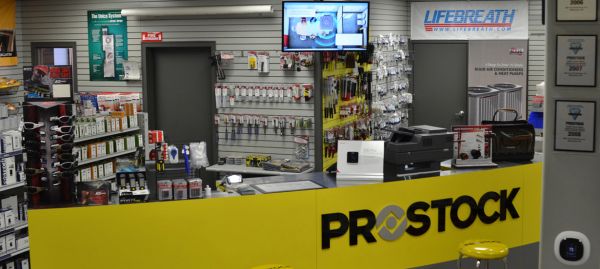
Support for the next service call.
Mar-Hy Distributors adopted the Prostock concept to enhance our support of local HVAC contractors. Since opening our Prostock store, we have received positive feedback from contractors on how they have improved response time to their customers. Our HVAC contractors have been able to stay ahead of the competition with access to our extensive inventory of Prostock Parts.
Quality parts. Contractor support.
Our Prostock replacement parts department is committed to improving the business of our HVAC contractors by providing quality services, competitive pricing, and products and supplies that earn customer trust and build lifetime customer satisfaction. We value our contractors and will continue to provide top of the line service for all of your HVAC needs.
Our team at Mar-Hy Distributors would like to thank you for your business.


